A tour of the builder. Weeks, sessions, blocks, movements, coaching notes, and how saving and updating work behind the scenes.
Program » Week » Session » Block » Movement
Every program is a tree. A program has weeks. A week has sessions. A session has blocks. A block has movements. You'll see this same structure in every Marrow program, whether you wrote it from scratch or cloned it from a marketplace template.
This shape matches how most coaches already think about training. If you've used a builder on another platform, the mental model is similar.
Drag and drop with keyboard alternatives
Weeks stack down the page. Sessions sit inside each week. You can drag a session to a different day, or to a different week entirely. Keyboard users can do the same with the move buttons next to each session.
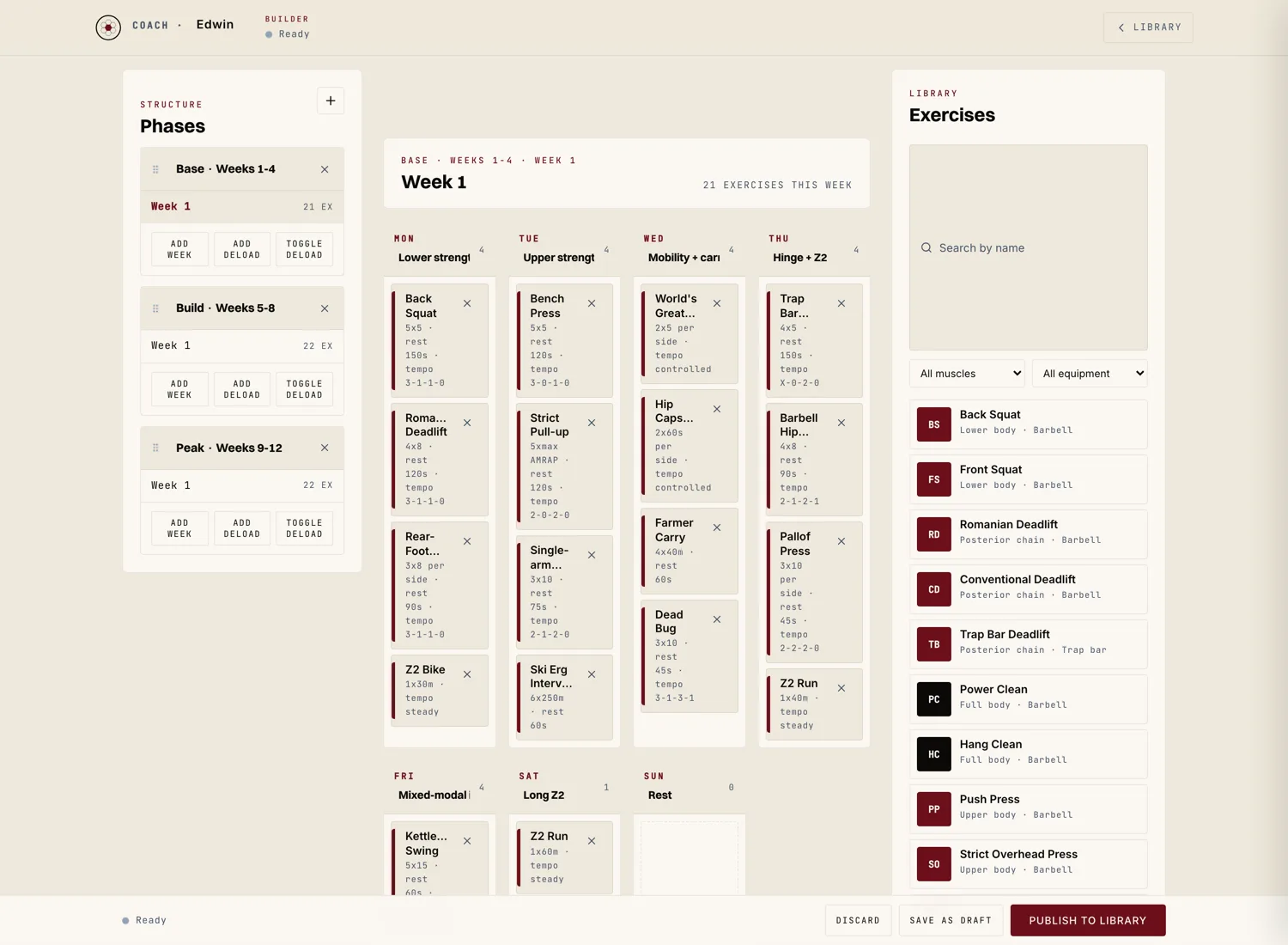
Right click (or hit the three dot menu) on any session to duplicate, delete, or copy to clipboard. Copy to clipboard lets you paste the session into a different program later.
Group movements that belong together
A block is a group of movements the athlete does together. Common block types: warm up, main lift, accessory, conditioning, cool down. You can name a block whatever you want. The athlete sees the block name in their session view.
Blocks can be supersets, circuits, EMOM, AMRAP, or straight sets. Pick the structure when you create the block. The athlete's view changes based on the structure (a superset shows pairs; an EMOM shows a timer).
The Marrow library plus your own customs
Movements pull from the Marrow movement library, which covers strength, conditioning, mobility, yoga, Pilates, and martial arts staples. Each movement has a name, optional video, and default cue text.
If a movement isn't in the library, hit "Add custom movement." Your custom stays private to your account and is reusable across all your future programs. If a custom movement gets enough use, our librarians may promote it to the public library (we credit the coach who added it).
The part that makes it coaching
Every session has a "Notes to athlete" field. Use it. The session is the workout. The notes are the coaching. Athletes read your notes more than they read your set and rep schemes.
You can also leave notes at the movement level for technical cues, and at the block level for intent.
Auto save every five seconds; athletes see updates immediately
Drafts save every five seconds of inactivity. You can close the tab and come back and your work is there. The local draft stays in your browser for up to 30 days even if you don't publish.
When you publish a program update, any athlete who has the program assigned sees a small "Updated" note on the affected sessions the next time they open the app. They don't get a push notification by default; the update is silent unless you message them about it.